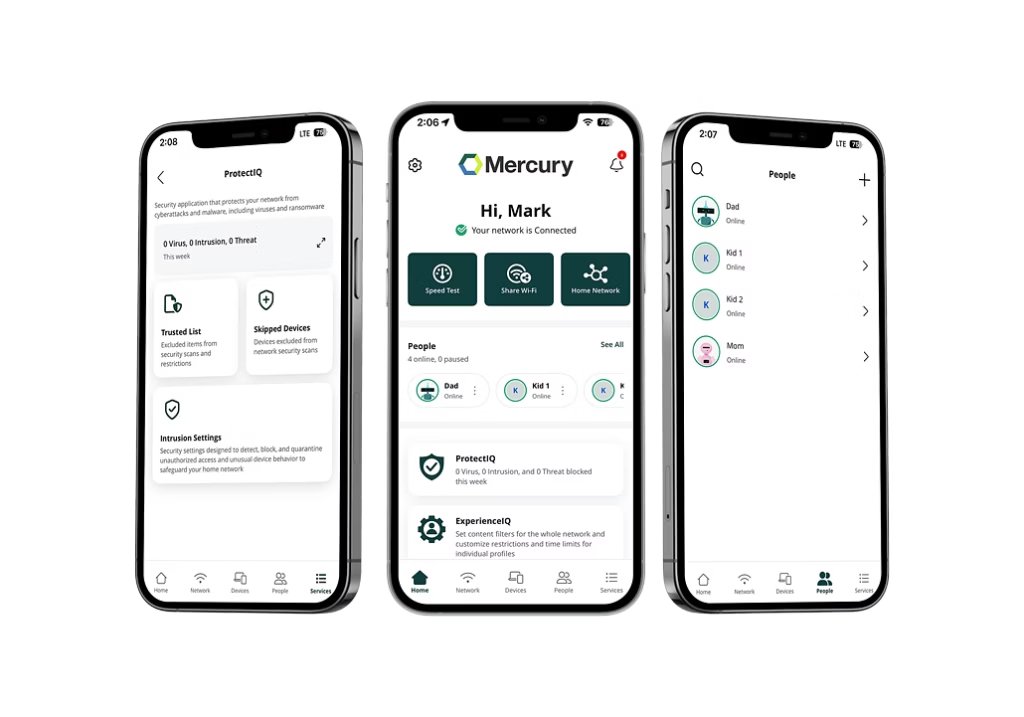
Reliable, high-speed Internet is a must have in today’s world of advancing technology. Mercury @ Home™ smartphone app puts full control of your household’s Internet experience at your fingertips. Enjoy easy to use management capabilities and IQ features.
Our app features a modern design and user-friendly interface, made with you in mind. Intuitive menus and quick selection make navigation a breeze so you can set preferences, monitor traffic, and manage content. In this blog, we will take a dive into some helpful features to give you better control of your network.
Key Takeaways:
- Full control from your phone: the Mercury @ Home™ app lets you manage your Wi-Fi password, devices and network settings in a few taps.
- Password lookup is quick: finding your network name and password takes about three taps through the app.
- Guest networks are simple: set up a separate network for visitors without exposing your main household connection.
- Device management is built in: see what’s connected, disconnect unwanted devices, or pause access with a tap, and reach support directly.
How do I Find The Password to my Network?
All it takes is three taps through the menus to find the current name, password, and security type of your wireless connection. First navigate to your network settings by selecting “My Network”. Then click on the network SSID you need a password for. Then you can view and edit information such as your network’s name and password all from your phone.
How do I set-up a guest network?
The Mercury @ Home™ app makes it easy to set up one or more separate guest networks. Give your guests access to our high-speed Internet service while protecting your family’s personal network. Guest networks are also support your home network’s cybersecurity by insulating your main network from outside vulnerabilities.
To set up a guest network, navigate to “My Network” and click on the “+” sign in the top right corner of the page. Select “Add Network” and from there you can select the network type, name (SSID), security type, and how long you want to separate traffic. Remember to save then you can connect freely.
How to Monitor Network Traffic
It’s always a good idea to know exactly which devices are connected to your network. The Mercury @ Home app lets you see exactly what devices are online, how much data each device is using and the bandwidth needed for smooth performance.
You also have the ability to disconnect unwanted devices, temporarily disable full or partial Internet access to specific devices, rename connections and even set device priority. No need to deal with confusing logistics of internet access control.
Under the “Things” section of the home screen, you are able to view all online devices. There you can freely change the name of the device, assign it to a person, and monitor it’s traffic all in one place.
Contact Mercury’s Support Team
Getting in touch with one of our representatives is available in just a few taps. Our experienced and dedicated staff are here to answer your questions and assist with Mercury account and service related problems. No need to pull out the phone book.
To get in contact with a member of our staff team, click on the settings icon in the right-hand corner of the home page. The click on contact support in the menu where you have access to multiple contact options available to you.
Download Mercury @ Home™
The Mercury @ Home™ app was created to simplify the control of your household’s connected life and elevate your Internet experience. Mercury Broadband is a leading provider of high-speed fiber Internet and digital phone services for homes and businesses across markets in the Midwest. Download the Mercury @ Home on the Apple App Store or Google Play Store.
Fiber or fixed wireless plans starting as low as $69, Mercury Fiber offers high-speed internet built for the way connected homes work today. We’re proud to serve homes across Indiana, Kansas, Michigan, Missouri, and Ohio. Check to see if we’re available at your home!
Mercury @ Home Frequently Asked Questions
With the Mercury @ Home app, you’re in complete control of your fiber internet. Easily check who’s connected, manage bandwidth, run speed tests and set up parental controls—all from your phone. It’s your all-in-one network management app designed to make everyday connectivity simple and stress-free. Learn more here.
Yes! The Mercury @ Home app is included at no extra cost for Mercury customers, so you can enjoy our powerful network management tools without paying anything extra.
Yes, you can instantly see every device connected to your network. Whether it’s family, guests, or smart home devices, you’ll always know what’s using your bandwidth in real time.
Keeping your family safe online is simple. You can set up parental controls, create profiles, manage screen time and pause internet access for specific devices in just a few taps.
It does! You can run a speed test anytime to check your fiber internet performance, spot slowdowns and make sure everything is running the way it should.
Yes, you’re in full control. Whether you want fewer distractions during homework, more family time at dinner or just a break from screens, you can easily pause Wi-Fi access for specific devices with a tap. It’s a simple way to manage usage and keep your home running exactly how you want.
No, you can stay in complete, effortless control from anywhere. Whether you’re at work, out walking your pet, enjoying quality time with friends, or away from home, the Mercury @ Home app lets you quickly check your network, make seamless changes and easily manage your Wi-Fi whenever you need—keeping everything conveniently right at your fingertips!